안녕하세요. berise입니다.
오늘 게시하는 프로그램은 게으름을 보충하기 위한 도구입니다. 본 프로그램은 지정된 게시판의 그림을 저장하는 기능을 가지고 있습니다. 전문 용어로 쉽게 설명하면 짤O 추출기입니다.
파일을 다운로드하고 압축을 풀면 두 개의 파일이 있습니다.
실행 파일과 설정 파일(~~~.cfg)입니다.
아마 설정 파일을 열고 적당히 편집하고 실행 파일을 실행하면 됩니다. cfg에 적을 내용은 아마 dcxxxx 사이트를 가시는 분들은 바로 알 수 있을 겁니다. "더 이상의 자세한 설명은 생략한다"라고요...
오류가 발생할 수도 있으나 그냥 무시하거나 다시 실행해 주시면 됩니다.
빈 화면만 있으면 심심할 것 같아서 출력을 넣었습니다만 출력에 대한 정확한 정보나 재미는 바라지 마시길 바랍니다.
Friday, December 24, 2010


Friday, November 19, 2010
명품? 멍품.... 한나라? 한나라
명품(名品)은 그 가치를 알고 진심으로 인정할 때 부르는 것이다. 여기서 주의할 점은 그 주체이다. 물건을 산 사람에 의한 평가라야 하는 것인데, 어찌된 것인지 만드는 사람이 스스로 평가하고 있다.
최근 벌어진 사고들을 보면 명품이 아닌 멍품(멍 때리는 품)이 아닌가 싶다. 이쯤 되면 명품의 이름을 걷을 때가 된 것 같은데.... 여기에서는 여전히 인색하다.
한나라는 恨나라가 되는 것이 아닌가 한다. 심히 걱정스럽다.
최근 벌어진 사고들을 보면 명품이 아닌 멍품(멍 때리는 품)이 아닌가 싶다. 이쯤 되면 명품의 이름을 걷을 때가 된 것 같은데.... 여기에서는 여전히 인색하다.
한나라는 恨나라가 되는 것이 아닌가 한다. 심히 걱정스럽다.
Thursday, June 10, 2010
Perl execution in Windows like unix
http://perlmonks.org/index.pl?node_id=147234
If your a perl programmer on Windows and find yourself running perl programs from the CLI (Command Line Interface) and get annoyed by having to run perl foo.pl all the time, then this is for you.
You don't have to do this if your running Windows NT 4/5 (2000) because theres a way round it. There are two little programs called assoc and ftype. These programs allow tou to associate the .pl extension or any other extension you use with the perl interpretor. so when you want to run a program called foo.pl you can just type foo at the CLI, as long as its in your CWD (Current Working Directory) or your PATH.
All you will need to do is follow these steps.
1) Open up a CLI. and enter these commands:
C:\> assoc .pl=PerlScript
C:\> ftype PerlScript=C:\Path\To\Perl\bin\perl.exe %1 %*
2) While still in the CLI type this:
C:\> set PATHEXT=.pl;%PATHEXT%
The PATHEXT environment variable contains the extension(s) to executables. So by adding .pl to this anything (files) found with the .pl extension will be treated as executable. This will only last for your CLI session, so if you want to make this a permanent thing do the following:
1) Right click on 'My Computer' and select properties. 2) Move along to the Advanced tab. 3) Click on Environment Variables. 4) In the System Variables double click on PATHEXT. 5) Append a ';.pl' to the end or a '.pl;' to the beggining of the Vari +able value box. 6) Click on all of the OK's and Apply's, restart your CLI and try it o +ut.
If your a perl programmer on Windows and find yourself running perl programs from the CLI (Command Line Interface) and get annoyed by having to run perl foo.pl all the time, then this is for you.
You don't have to do this if your running Windows NT 4/5 (2000) because theres a way round it. There are two little programs called assoc and ftype. These programs allow tou to associate the .pl extension or any other extension you use with the perl interpretor. so when you want to run a program called foo.pl you can just type foo at the CLI, as long as its in your CWD (Current Working Directory) or your PATH.
All you will need to do is follow these steps.
1) Open up a CLI. and enter these commands:
C:\> assoc .pl=PerlScript
C:\> ftype PerlScript=C:\Path\To\Perl\bin\perl.exe %1 %*
2) While still in the CLI type this:
C:\> set PATHEXT=.pl;%PATHEXT%
The PATHEXT environment variable contains the extension(s) to executables. So by adding .pl to this anything (files) found with the .pl extension will be treated as executable. This will only last for your CLI session, so if you want to make this a permanent thing do the following:
1) Right click on 'My Computer' and select properties. 2) Move along to the Advanced tab. 3) Click on Environment Variables. 4) In the System Variables double click on PATHEXT. 5) Append a ';.pl' to the end or a '.pl;' to the beggining of the Vari +able value box. 6) Click on all of the OK's and Apply's, restart your CLI and try it o +ut.
Wednesday, March 03, 2010
[APP] BTools2 for Windows Mobile (Iperf for Windows Mobile 5, 6)
NOTE. I move this application to blogger because xda only allow downloads who logged in.
Please read following article that I've written in xda-developers site.
Please follow following folder icon to find new releases.
BTools2(This release) is available up to 2010.12.25 23:59:59.
------------------------------------------------------------------------
I'll introduce handy tools for checking network performance including latency and bandwidth.
Simply it is a mobile version of iperf.
If you want to know about iperf, please see following links about http://en.wikipedia.org/wiki/Iperf
You can check latency with ping tab and bandwidth with iperf client/server tabs. iperf in BTools is based on version 1.7.0.
Please see following screenshots. (working in WM6.x, WM5.0)
Requirements:
- Windows Mobile 5.0/6.0
- 240x320 Resolution (longer height doesn't matter)
Features:
- Provides ping to check latency between nodes.
- Visualization of ping latency graph.
- Provides full functionality of iperf client and server.(based on 1.7.0)
- Logs for ping, iperf client & server.(\My Documents\btools_log\)
Ping Usage:
- Connect to internet.
- For Ping, Just type target host and press button "Ping"
- See results graphs. Log will be \My Documents\btools_log.
Iperf Usage: (Mobile Client to PC Server)
- you have to install iperf-1.7.0 before running PC server. (ask google iperf-win32-1.7.0)
- In PC, open console box and run "iperf -s"
- In Mobile, Choose iperf client tab and type server's IP Press "Start"
- iperf will run 10 seconds if -t option is not specified.
- Log will be \My Documents\btools_log.
Iperf Usage: (Mobile Client to Mobile Server)
- Choose iperf server tab, and press "Start"
- Choose iperf client tab, and type server's IP and Press "Start"
Screenshot (WM 6) :

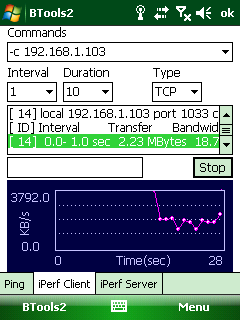

ChangeLog
2010-3-30
- This version is available up to 2010.12.30
2010-3-3
- This version is available up to 2010.3.19
2010-1-11
- This version is available up to 2010.2.10
2009-11-23
- BTools2 for Windows Mobile 5.x is released (please see 3rd picture)
- MRU for ping address
- MRU for iperf client commands
- icons on each tabs
(old)
- Ping has options: counts, data size.
- iperf clients also has GUI options. Command line is also supported as well.
Please read following article that I've written in xda-developers site.
Please follow following folder icon to find new releases.
BTools2(This release) is available up to 2010.12.25 23:59:59.
------------------------------------------------------------------------
I'll introduce handy tools for checking network performance including latency and bandwidth.
Simply it is a mobile version of iperf.
If you want to know about iperf, please see following links about http://en.wikipedia.org/wiki/Iperf
You can check latency with ping tab and bandwidth with iperf client/server tabs. iperf in BTools is based on version 1.7.0.
Please see following screenshots. (working in WM6.x, WM5.0)
Requirements:
- Windows Mobile 5.0/6.0
- 240x320 Resolution (longer height doesn't matter)
Features:
- Provides ping to check latency between nodes.
- Visualization of ping latency graph.
- Provides full functionality of iperf client and server.(based on 1.7.0)
- Logs for ping, iperf client & server.(\My Documents\btools_log\)
Ping Usage:
- Connect to internet.
- For Ping, Just type target host and press button "Ping"
- See results graphs. Log will be \My Documents\btools_log.
Iperf Usage: (Mobile Client to PC Server)
- you have to install iperf-1.7.0 before running PC server. (ask google iperf-win32-1.7.0)
- In PC, open console box and run "iperf -s"
- In Mobile, Choose iperf client tab and type server's IP Press "Start"
- iperf will run 10 seconds if -t option is not specified.
- Log will be \My Documents\btools_log.
Iperf Usage: (Mobile Client to Mobile Server)
- Choose iperf server tab, and press "Start"
- Choose iperf client tab, and type server's IP and Press "Start"
Screenshot (WM 6) :
- BTools2 for WM 6.x (Ping)
- BTools2 for WM 6.x (iperf client)
- BTools2 for WM 5.x (iperf server)


ChangeLog
2010-3-30
- This version is available up to 2010.12.30
2009-11-23
- BTools2 for Windows Mobile 5.x is released (please see 3rd picture)
- MRU for ping address
- MRU for iperf client commands
- icons on each tabs
(old)
- Ping has options: counts, data size.
- iperf clients also has GUI options. Command line is also supported as well.
What's Wrong??
---------------------------------------------------------
I don't know why I have to upload files at this time. (localtime 01:56)
I don't know why I need more time to sleep.
I don't know why performance based rewarding system is working on everywhere.
I don't know why I can not care for my family.
I don't know why I can not do anything else but doing work like as a workaholic.
What's Wrong?? ww, ww, ww, ww, ww
---------------------------------------------------------
I don't know why I have to upload files at this time. (localtime 01:56)
I don't know why I need more time to sleep.
I don't know why performance based rewarding system is working on everywhere.
I don't know why I can not care for my family.
I don't know why I can not do anything else but doing work like as a workaholic.
What's Wrong?? ww, ww, ww, ww, ww
---------------------------------------------------------
kobus table 서울경부 -> 대전
응? 언제부터 표가 이렇게잘 붙었지??
15분 마다 있고.. 2시간이 채 안 걸리는 구만.. 역시 버스 전용선...
15분 마다 있고.. 2시간이 채 안 걸리는 구만.. 역시 버스 전용선...
| 검색결과) 2010년 03월 03일 [수요일] 14:30 이후 서울경부 -> 대전 | |||||||||||||||||||||||||||||||||||||||||||||||||||||||||||||||||
| |||||||||||||||||||||||||||||||||||||||||||||||||||||||||||||||||
| |||||||||||||||||||||||||||||||||||||||||||||||||||||||||||||||||
Wednesday, February 24, 2010
iphone 3.1.3

뭐 특별한 것은 없지만, 이제 음성 녹음을 할 수 있다는 정도....
그 대가는 모아두었던 메모, 사진들이 사라졌다는 것.
뭐 모바일 기기에 저장된 것은 한 순간에 사라지 수 있다능....
Monday, December 28, 2009
와이브로 속도 측정 결과 #1
안녕하세요.
이번 게시물은 와이브로 대역폭 측정을 수행한 결과를 게시한 글입니다.
아마 많은 와이브로 사용자 들이 자신이 사용하고 있는 와이브로 서비스가 과연 제대로된 품질을 보장 받고 있는가에 대한 의문이 많이 드는 것은 사실입니다. 왜냐하면 대역폭을 측정하는 것이 쉬운 일이 아니며, 특히 스마트폰과 같은 장치를 사용할 경우 측정할 수 있는 방법이 마땅치 않기 때문입니다.
이러한 궁금증을 어느정도 해결하기 위해 제가 테스트한 결과를 올리니 참고 바랍니다.
우선 테스트 환경은 다음과 같습니다.
테스트 방법
1. 와이브로 단말기에 iperf 서버를 실행한다.
2. PC에서 iperf 서버로 아래 명령을 수행하여 각각의 측정 결과를 저장한다.
iperf -c 125.152.224.177 -i 1 -t 10 -f KBytes -w [8k|16k|32k|64k|128k|256k]
* 125.152.224.177 은 와이브로 IP이다. 이 것은 125.152.x.x의 주소범위를 가진다.
테스트 결과
- LG-KC1에서의 와이브로 대역폭은 그리 만족스럽지 못하다. 또한 테스트 하는 동안 대역폭이 0 KBytes로 떨어지는 구간이 있었으며(이 구간은 ping 역시 timeout이 발생한다) 서비스 품질이 일정치 않은 결과를 보여주고 있다. 아래 TCP Windows Size별 그래프를 참고하자.
위 그래프에 대한 로그 파일은 필요시 업로드할 예정입니다.
* PC의 접속 환경이 나빠서 결과가 좋지 않을 수도 있습니다. 하지만, 와이브로의 접속 환경은 PC의 것보다 훨씬! 나쁘기 때문에 큰 무리가 없다고 생각함.
* Wibro 접속은 Dryrun을 해도 별 차이가 없이 나쁩니다. 그래서 16k 부터는 1번의 테스트만 수행하였습니다.


윈도우 사이즈별 대역폭 평균 그래프는 아래와 같다. 역시나 들죽날죽하다.
그래도 이 정도면 스트리밍 서비스는 가능할 듯 보인다. ping 응답의 timeout은 어떻게 해결을 해야 품질이 좋아질 것으로 보인다.

로그 파일은 생략합니다. 인증이 필요한 경우 올리는 것도 고려하겠음.
아마 많은 와이브로 사용자 들이 자신이 사용하고 있는 와이브로 서비스가 과연 제대로된 품질을 보장 받고 있는가에 대한 의문이 많이 드는 것은 사실입니다. 왜냐하면 대역폭을 측정하는 것이 쉬운 일이 아니며, 특히 스마트폰과 같은 장치를 사용할 경우 측정할 수 있는 방법이 마땅치 않기 때문입니다.
이러한 궁금증을 어느정도 해결하기 위해 제가 테스트한 결과를 올리니 참고 바랍니다.
- 와이브로 서비스 사업자 : KT
- 단말기 : LG-KC1 (Windows Mobile 5.x) 와이브로 내장 모델
- 측정 도구 : iperf-1.7.0 (PC), btools2 for Windows Mobile (모바일용은 링크 참조)
- 테스트 인자 : -i 1 -t 10 -w
1. 와이브로 단말기에 iperf 서버를 실행한다.
2. PC에서 iperf 서버로 아래 명령을 수행하여 각각의 측정 결과를 저장한다.
iperf -c 125.152.224.177 -i 1 -t 10 -f KBytes -w [8k|16k|32k|64k|128k|256k]
* 125.152.224.177 은 와이브로 IP이다. 이 것은 125.152.x.x의 주소범위를 가진다.
- LG-KC1에서의 와이브로 대역폭은 그리 만족스럽지 못하다. 또한 테스트 하는 동안 대역폭이 0 KBytes로 떨어지는 구간이 있었으며(이 구간은 ping 역시 timeout이 발생한다) 서비스 품질이 일정치 않은 결과를 보여주고 있다. 아래 TCP Windows Size별 그래프를 참고하자.
위 그래프에 대한 로그 파일은 필요시 업로드할 예정입니다.
* PC의 접속 환경이 나빠서 결과가 좋지 않을 수도 있습니다. 하지만, 와이브로의 접속 환경은 PC의 것보다 훨씬! 나쁘기 때문에 큰 무리가 없다고 생각함.
* Wibro 접속은 Dryrun을 해도 별 차이가 없이 나쁩니다. 그래서 16k 부터는 1번의 테스트만 수행하였습니다.


그래도 이 정도면 스트리밍 서비스는 가능할 듯 보인다. ping 응답의 timeout은 어떻게 해결을 해야 품질이 좋아질 것으로 보인다.

Wednesday, November 25, 2009
쉽게 설명하는 것인가 어렵게 설명하는 것인가?
신문을 보다보면 종종 숫자(주로 통계)가 많이 언급되고 있으며 이를 통해 사람들은 어느 정도의 정량적인 평가를 할 수 있다. 그런데 최근 들어 많은 매체를(신문, 방송, 지자체 보도, 심지어 정부 보고, 특히 보건 관련 기사들) 보면 이들 숫자를 교묘히 적고 있다.
다시 말해서 자기들의 편익을 위해 숫자의 기입 방식을 바꾼다. 좀 더 쉽게 말하면 나쁜 일에는 큰 숫자 표시를 줄이고, 좋은 일에는 큰 숫자 표시를 늘인다는 것이다.
다음 예를 보자. 인터넷 동아일보에 싣은 연합 뉴스 기사다.
"WHO는 지난 19일 신종플루 백신을 접종받은 후 숨진 30명에 대한 검사를 했으나, 백신과 사망 원인 사이에 직접적인 연관성은 드러나지 않았다는 입장을 밝힌 바 있다.
WHO에 따르면 신종플루 백신 접종 후 사망 사례는 16개국에서 접종이 이뤄진 6천500만 회분의 백신 중 극히 일부로, 1만 회분에 1건 꼴로 역효과가 나타났으며 보고된 역효과 100건 가운데 사망 등으로 상황이 악화되는 경우는 5건 정도다."
위 기사를 보고 몇 명이 사망했는지 바로 알 수 있나? 적어도 필자의 경우는 알기 어렵다이다. 블로그를 방문해 주신 분들을 위해 다시 계산해 드리겠다.
1만 회분에 1건이면 6500,0000회 = 6500건
역효과 100건당 5건이 사항 = 6500 / 100 * 5 = 325명
즉 사망 숫자는 6천500만회분 중 이 325건이 되겠다. 확률로 치면 0.005%되겠다.
기사를 보면 X / Y = Z, Z / A = C. 즉 C 만큼이다 라는 계산을 쓰고 있다. 독자들의 두뇌 회전을 위해 친절히 쓴 기사인지...
뉴스의 생명인 신속 정확은 맞지만, 이렇게 전달하는 것은..... 어떻게 해석을 해야 할지 모르겠다.
또 다른 예시도 들어보면....
부동산 가격 그래프를 자세히 보면 상승률 그래프는 납작하게 표현되고, 하강 그래프는 길게 표현된다. 다시 말하면, y 축을 늘였다 줄였다 한다는 것. 심리적인 영향을 고려해서 그런지는 모르겠다. 또한 y축의 간격을 보면 상승은 0.1 ~ 0.3인 경우가 많고 하강은 금액을 쓰는 경우가 많다.
수출 그래프의 경우 %를 많이 쓴다. 이것은 2배 보다 100% 성장이 눈에 더 띄기 때문이겠지요.
다시 말해서 자기들의 편익을 위해 숫자의 기입 방식을 바꾼다. 좀 더 쉽게 말하면 나쁜 일에는 큰 숫자 표시를 줄이고, 좋은 일에는 큰 숫자 표시를 늘인다는 것이다.
다음 예를 보자. 인터넷 동아일보에 싣은 연합 뉴스 기사다.
"WHO는 지난 19일 신종플루 백신을 접종받은 후 숨진 30명에 대한 검사를 했으나, 백신과 사망 원인 사이에 직접적인 연관성은 드러나지 않았다는 입장을 밝힌 바 있다.
WHO에 따르면 신종플루 백신 접종 후 사망 사례는 16개국에서 접종이 이뤄진 6천500만 회분의 백신 중 극히 일부로, 1만 회분에 1건 꼴로 역효과가 나타났으며 보고된 역효과 100건 가운데 사망 등으로 상황이 악화되는 경우는 5건 정도다."
위 기사를 보고 몇 명이 사망했는지 바로 알 수 있나? 적어도 필자의 경우는 알기 어렵다이다. 블로그를 방문해 주신 분들을 위해 다시 계산해 드리겠다.
1만 회분에 1건이면 6500,0000회 = 6500건
역효과 100건당 5건이 사항 = 6500 / 100 * 5 = 325명
즉 사망 숫자는 6천500만회분 중 이 325건이 되겠다. 확률로 치면 0.005%되겠다.
기사를 보면 X / Y = Z, Z / A = C. 즉 C 만큼이다 라는 계산을 쓰고 있다. 독자들의 두뇌 회전을 위해 친절히 쓴 기사인지...
뉴스의 생명인 신속 정확은 맞지만, 이렇게 전달하는 것은..... 어떻게 해석을 해야 할지 모르겠다.
또 다른 예시도 들어보면....
부동산 가격 그래프를 자세히 보면 상승률 그래프는 납작하게 표현되고, 하강 그래프는 길게 표현된다. 다시 말하면, y 축을 늘였다 줄였다 한다는 것. 심리적인 영향을 고려해서 그런지는 모르겠다. 또한 y축의 간격을 보면 상승은 0.1 ~ 0.3인 경우가 많고 하강은 금액을 쓰는 경우가 많다.
수출 그래프의 경우 %를 많이 쓴다. 이것은 2배 보다 100% 성장이 눈에 더 띄기 때문이겠지요.
Monday, November 23, 2009
낚시글 기사(etnews)
etnews에서 게재한 아래 기사 제목을 한 번 보자.
KT, 아이폰 3종 28일 공식 출시
인용 "이번에 출시되는 아이폰은 3G 8기가바이트(Gb)와 3GS 16Gb 및 32Gb 등 총 3종으로..."
실제 기사를 보면 내장 메모리(8, 16, 32)에 따라 3종을 출시한다고 한다. 무슨 말인지?
아이폰은 한가지 종류입니다. 거기에 메모리만 다른데 이걸 3종으로 표현하는 것은 그야말로 부풀리기의 참사례를 보여주는 것입니다. 낚시 뉴스이죠. 참 씁쓸합니다.
또 하나, 출시하는 것은 3GS라고 되어 있습니다.
기사의 생명은 신속, 정확입니다. 거기에 책임지는 모습도 필요하겠지요.
KT, 아이폰 3종 28일 공식 출시
인용 "이번에 출시되는 아이폰은 3G 8기가바이트(Gb)와 3GS 16Gb 및 32Gb 등 총 3종으로..."
실제 기사를 보면 내장 메모리(8, 16, 32)에 따라 3종을 출시한다고 한다. 무슨 말인지?
아이폰은 한가지 종류입니다. 거기에 메모리만 다른데 이걸 3종으로 표현하는 것은 그야말로 부풀리기의 참사례를 보여주는 것입니다. 낚시 뉴스이죠. 참 씁쓸합니다.
또 하나, 출시하는 것은 3GS라고 되어 있습니다.
기사의 생명은 신속, 정확입니다. 거기에 책임지는 모습도 필요하겠지요.
Monday, November 09, 2009
Something wrong in Load() in CxImage with unknown file name(file type)
My Purpose on this sample application is to merge Special FX lib and CxImage. (You can see Special fx in my blog -- This code is originally uploaded at codeproject.com and I've ported to Windows Mobile)
Issues : CxImage has a bug in decoding unknown file using Load(). It raises an exception like this.
RaiseException: Thread=97a3d0a8 Proc=80096d60 'SFX.exe'
AKY=00001001 PC=03f91e7c(coredll.dll+0x00043e7c) RA=88037538(NK.EXE+0x00007538) BVA=00000000 FSR=00000000
I'll upload new article if I found something with Load()
Issues : CxImage has a bug in decoding unknown file using Load(). It raises an exception like this.
RaiseException: Thread=97a3d0a8 Proc=80096d60 'SFX.exe'
AKY=00001001 PC=03f91e7c(coredll.dll+0x00043e7c) RA=88037538(NK.EXE+0x00007538) BVA=00000000 FSR=00000000
I'll upload new article if I found something with Load()
Resolution to code 0x8007007e (WTL, Windows Mobile)


Demo_ce in CxImage 6.0.
- Property->Library->Input (a.lib, b.lib, c.lib, ...)
- Property->Library->Custom (a.lib, b.lib, c.lib, ...)
Although it looks almost same, Input field has some conflicts in order. But Custom field doesn't have.
So conclusion in here is use custom field. (if you want to avoid stupid nuisances)
Friday, November 06, 2009
code 0x8007007e (WTL) (2/2)
Environments : Visual Studio 2005, WTL WTL80_7161_Final, Windows Mobile 6.0 emulator
Finally I found the solution to solve 0x8007007e error on my project. Error looks like this.

I was testing with my newly built CxImage. And I just copy library setting from demo_ce which is included in CxImage.
I Put these libraries(png.lib jpeg.lib zlib.lib tiff.lib jbig.lib jasper.lib cximaged.lib) at the end of "Setting -> Linker -> Additional Dependency" (속성-> 링커 ->입력->추가 종속성)
then I deploy and as I ran an application I encountered "code 0x8007007e" -_-;
PS. Please read my next article about resolution to this.
Finally I found the solution to solve 0x8007007e error on my project. Error looks like this.

I was testing with my newly built CxImage. And I just copy library setting from demo_ce which is included in CxImage.
I Put these libraries(png.lib jpeg.lib zlib.lib tiff.lib jbig.lib jasper.lib cximaged.lib) at the end of "Setting -> Linker -> Additional Dependency" (속성-> 링커 ->입력->추가 종속성)
then I deploy and as I ran an application I encountered "code 0x8007007e" -_-;
PS. Please read my next article about resolution to this.
code 0x8007007e (MFC) (1/2)
When I build my simple WTL application and deployed to an emulator and then I ran into following problem.
error messages appears:
Unable to start program 'MyProgram.exe'.
An error occurred that usually indicates a corrupt installation (code 0x8007007e). If the problem persists, repair your Visual Studio installation via 'Add or Remove Programs' in Control Panel.
Reason for Error: Project is dynamically linked to MFC, but the neccessary dll files are not deployed to the Emulator.
Solution for this error (MFC)
Solution: Setting: "Additional Files" which is in "Configuration Properties Deployment". Copy the value from the new default project into the old project that doesn't work.
Here's the settings for release mode: (Be careful, there's no spaces)
msvcr90.dll$(BINDIR)\$(INSTRUCTIONSET)\%CSIDL_PROGRAM_FILES%\$(ProjectName)0;atl90.dll$(BINDIR)\$(INSTRUCTIONSET)\%CSIDL_PROGRAM_FILES%\$(ProjectName)0;MFC90U.dll$(BINDIR)\$(INSTRUCTIONSET)\%CSIDL_PROGRAM_FILES%\$(ProjectName)0;
And the settings for debug mode:
msvcr90.dll$(BINDIR)\$(INSTRUCTIONSET)\%CSIDL_PROGRAM_FILES%\$(ProjectName)0;atl90.dll$(BINDIR)\$(INSTRUCTIONSET)\%CSIDL_PROGRAM_FILES%\$(ProjectName)0;msvcr90d.dll$(BINDIR)\$(INSTRUCTIONSET)\%CSIDL_PROGRAM_FILES%\$(ProjectName)0;MFC90UD.dll$(BINDIR)\$(INSTRUCTIONSET)\%CSIDL_PROGRAM_FILES%\$(ProjectName)0;
Found on Googling
--
BUT there's no dll depdendencies in my project since it is using WTL and static libraries only.
What do I do now???? I'm doing googling.
I'll upload solution if found.
error messages appears:
Unable to start program 'MyProgram.exe'.
An error occurred that usually indicates a corrupt installation (code 0x8007007e). If the problem persists, repair your Visual Studio installation via 'Add or Remove Programs' in Control Panel.
Reason for Error: Project is dynamically linked to MFC, but the neccessary dll files are not deployed to the Emulator.
Solution for this error (MFC)
Solution: Setting: "Additional Files" which is in "Configuration Properties Deployment". Copy the value from the new default project into the old project that doesn't work.
Here's the settings for release mode: (Be careful, there's no spaces)
msvcr90.dll$(BINDIR)\$(INSTRUCTIONSET)\%CSIDL_PROGRAM_FILES%\$(ProjectName)0;atl90.dll$(BINDIR)\$(INSTRUCTIONSET)\%CSIDL_PROGRAM_FILES%\$(ProjectName)0;MFC90U.dll$(BINDIR)\$(INSTRUCTIONSET)\%CSIDL_PROGRAM_FILES%\$(ProjectName)0;
And the settings for debug mode:
msvcr90.dll$(BINDIR)\$(INSTRUCTIONSET)\%CSIDL_PROGRAM_FILES%\$(ProjectName)0;atl90.dll$(BINDIR)\$(INSTRUCTIONSET)\%CSIDL_PROGRAM_FILES%\$(ProjectName)0;msvcr90d.dll$(BINDIR)\$(INSTRUCTIONSET)\%CSIDL_PROGRAM_FILES%\$(ProjectName)0;MFC90UD.dll$(BINDIR)\$(INSTRUCTIONSET)\%CSIDL_PROGRAM_FILES%\$(ProjectName)0;
Found on Googling
--
BUT there's no dll depdendencies in my project since it is using WTL and static libraries only.
What do I do now???? I'm doing googling.
I'll upload solution if found.
Windows Mobile Test Apps (CxImage 6.0 ce)
I've built CxImage 6.0 for Windows Mobile 6.0 Professional Version.


Although there need some tweaks in vanilla version of CxImage_ce But It doesn't have any problem to build built demo_ce and it works just fine.
Supported Formats : png, jpg, tif, gif, ... You can add as much as you like.
Supported Formats : png, jpg, tif, gif, ... You can add as much as you like.
Wednesday, October 28, 2009
iperf for Windows Mobile 6.1
iperf for Windows Mobile 6.1 is released. Blogger doesn't allow file upload so here's a link to btools cab file.
BTools2 (maybe Windows Mobile 6.0 or above)
Requirements:
I'm considering about not to build Windows Mobile 5.0 anymore.
Because It's little bit burden to me to bulid several versions. (5.0, 6.1, 6.5)
I don't know whether application built with 6.0 SDK is compatible with 5.0 devices.
So If you need a 5.0 build, please send me a email. If there're many requests than I'll think about it. ;-)
BTools2 (maybe Windows Mobile 6.0 or above)
Requirements:
- Windows Mobile 6.x
- 240x320 Resolution (longer height doesn't matter)
- Ping to check latency between nodes (with ping graph)
- Provides full functionality of iperf client and server.(based on 1.7.0)
- iperf in BTools is 100% compatible with Windows and Linux version.
- Logs for ping, iperf client & server.(\My Documents\btools_log\)
- Now use btools.ini to save MRU(You don't need to type SIP again, once you've done)
I'm considering about not to build Windows Mobile 5.0 anymore.
Because It's little bit burden to me to bulid several versions. (5.0, 6.1, 6.5)
I don't know whether application built with 6.0 SDK is compatible with 5.0 devices.
So If you need a 5.0 build, please send me a email. If there're many requests than I'll think about it. ;-)
Friday, October 02, 2009
강원도 속초 대포항의 사기극
강원도 속초에 처음 가시는 분들은 이 글을 참고 하시고 조심 하시길 바랍니다.
-=-=-=-=-=-=-=-=-=-=-=-=-=-=-=-=-=-=-=-=-=-=-=-=-=-=-=-=-=-=-=-=
이제 가을이라 단풍도 들고 더 추워지기 전에 대포항으로 길을 잡았다.
들뜬 마음으로 배후령, 미시령을 넘고 넘어 갔었다. 저녁을 위해 대포항에 들러 회를 포장할려고 맘 맘고 있었다.
막상 대포항에 가니 북적대는 사람들로 정신이 없었다.
여기저기 한 바구니에 오징어, 돔, 광어, xx 등 5 가지를 담아 두고 5만원 이란다.
회를 뜨고 일회용 용기에 담아 주는데, 이걸 그만 덥석 들고 숙소로 온 것이다.
거기서 확인해야 하는데...
숙소로 와서 열어 보니.. 꼴랑 들어 있는 것은 3 가지 종류 밖에 없는 것이다.
그제서야 생각이 났다. 대포항에서 사기치는 상인들이 많다는 것을... 하지만 어쩔거냐.. 이미 숙소로 돌아 온 것을..
맘 상하고 돈 읽고 울며 겨자 먹기로 넘어 가지 않는 회를 초장 발라 먹고 있다.
그래.. 다음 부터는 대포항은 절대 가지 않는다. 대포항 상인회는 들으라.. 나 뿐만 아니고 모든 곳에 광고를 할 것이다. 대포항은 가지 말라고..
거기 동네 분들은 고민 한 번 해 보시지요.. 예전에도 회로 사기 치다가 뉴스 난 곳이 아니오?
-=-=-=-=-=-=-=-=-=-=-=-=-=-=-=-=-=-=-=-=-=-=-=-=-=-=-=-=-=-=-=-=
이제 가을이라 단풍도 들고 더 추워지기 전에 대포항으로 길을 잡았다.
들뜬 마음으로 배후령, 미시령을 넘고 넘어 갔었다. 저녁을 위해 대포항에 들러 회를 포장할려고 맘 맘고 있었다.
막상 대포항에 가니 북적대는 사람들로 정신이 없었다.
여기저기 한 바구니에 오징어, 돔, 광어, xx 등 5 가지를 담아 두고 5만원 이란다.
회를 뜨고 일회용 용기에 담아 주는데, 이걸 그만 덥석 들고 숙소로 온 것이다.
거기서 확인해야 하는데...
숙소로 와서 열어 보니.. 꼴랑 들어 있는 것은 3 가지 종류 밖에 없는 것이다.
그제서야 생각이 났다. 대포항에서 사기치는 상인들이 많다는 것을... 하지만 어쩔거냐.. 이미 숙소로 돌아 온 것을..
맘 상하고 돈 읽고 울며 겨자 먹기로 넘어 가지 않는 회를 초장 발라 먹고 있다.
그래.. 다음 부터는 대포항은 절대 가지 않는다. 대포항 상인회는 들으라.. 나 뿐만 아니고 모든 곳에 광고를 할 것이다. 대포항은 가지 말라고..
거기 동네 분들은 고민 한 번 해 보시지요.. 예전에도 회로 사기 치다가 뉴스 난 곳이 아니오?
Monday, March 16, 2009
iPhone 2.2.1 & siphon

siphone은 친절한 samuel씨가 만든 소프트폰으로 http://code.google.com/p/siphon/에 설명이 되어 있다. 조금 더 자세히 말하면 siphon은 pjsip을 기반으로 iphone UI를 탑재한 것이다. 말은 참 쉽군...
설치는 간단하게 Cydia를 통해 할 수 있다. 처음 설치한 버전은 2.0.6이었다. 잘 동작하는 버전이다.
*** 주의 사항 : Cydia에 올라온 2.0.7을 설치하면 전화가 안된다. 제가 가진 폰으로는 안 됩니다. 주의 하시길 바랍니다.

기본 설정으로 자리 잡고 있는 "전화"는 다른 곳으로 밀려나고 siphone이 그 자리에 위치하게 된다. WiFi 덕분에 설정을 자주 하는 관계로 "설정"이 아래 하단으로 내려왔다.

간단하게 기본 설정을 한 후 모습이다. 이제 통화를 하면 된다.
전화는 음성 품질 문제가 가장 중요한 것으로 iPhone의 siphon을 기준으로 평가한다면 5점 만점에 3.5점을 주고 싶다. 물론 MOS 값으로 제시하면 좋겠으나, 어디까지나 내 귀를 기준으로 하는 것이니...
점수를 많이 받지 못하는 이유로는, Ear-Speaker로의 출력이 약간 뭉굴어진 것과 상대방이 들을 때 소리가 늘어지는 듯한 품질 때문이라 하겠다.

설정탭이다. Echo Canceller와 Silence detector가 보인다.
Monday, March 02, 2009
IPerf for Windows Mobile 5.0
I'm currently developing Iperf for Windows Mobile. It is still in alpha test but almost everything is implemented. Soon you'll be able to download this software(WM5). There will be a time limit(about 3 month) but all functionalities will be available. After 3 month? just download again from link on this site. ^^
Following pictures show running on Windows Mobile 5.1 (320x240)

Combobox shows available command line options.
Pressing start button will add options back to combobox. Graph will be display if correctly connected with server which can be any iperf-1.7.0 server running any platform.

Left static box shows currently running iperf server IP. (you'd better remember this if you don't want to click tab again ^^)

ping to check latency between nodes
Following pictures show running on Windows Mobile 5.1 (320x240)

- IPerf Client
Combobox shows available command line options.
Pressing start button will add options back to combobox. Graph will be display if correctly connected with server which can be any iperf-1.7.0 server running any platform.

- IPerf Server
Left static box shows currently running iperf server IP. (you'd better remember this if you don't want to click tab again ^^)

ping to check latency between nodes
Subscribe to:
Posts (Atom)